
.png?width=670&height=377&name=August%2016%20-%20Webinar%20(1).png)
As you embark on your journey with your Remote Professional , this Onboarding Guide is designed to ensure that you are fully prepared for a successful and efficient collaboration. Our goal is to streamline the integration of your new Remote Professional into your business operations, making the transition as smooth and effective as possible.
Purpose of this Guide
The purpose of this Onboarding Guide is to provide you, the client, with a comprehensive framework to:
-
Clearly understand the roles and responsibilities involved in working with your Remote Professional.
-
Set up essential communication and project management tools that will support your daily operations.
-
Establish operational guidelines and protocols that align with your business goals and the specific tasks assigned to your Remote Professional.
Why Is This Important?
Effective onboarding is critical to maximizing the productivity and effectiveness of your new Remote Professional . By setting clear expectations and providing the right tools and information from the start, you can:
Accelerate the ramp-up period, allowing your Remote Professional to become productive more quickly.Avoid common misunderstandings and miscommunications that can arise in remote work settings.
Build a strong foundation for a long-term partnership that supports your business growth and adapts to your evolving needs.
By following this guide, you will not only enhance your own experience but also provide your Remote Professional with the necessary support to excel in their role. We are committed to facilitating a partnership that drives value for your business and fosters a collaborative and rewarding work environment.
🤔 How to Prepare for Onboarding?
👤 Client Responsibilities
- Identify Your Needs And Goals: Begin by defining your objectives and needs. Prioritize tasks, set clear goals, and identify areas needing efficiency boosts. This will help you focus on tasks that directly support your goals.
- Understand The Remote Professional ’s Role In Your Workflow: Your Remote Professional can streamline task completion efficiently. Effective delegation requires recognizing their strengths, skills, and areas of responsibility.
- Set Up Tools For Your Remote Professional : It is crucial to provide your Remote Professional with the necessary tools and resources to maintain efficient productivity. Ensure they have access to key software, platforms, and applications needed for task management.
- Access To Company Policies And Documents: Your Remote Professional should be familiar with all your established policies, procedures, and crucial documents. Provide them with any of these if you have- employee handbook, company directory, organizational chart, and any other relevant materials to help them understand the company culture and function effectively as your strategic partner.
⚒️ Technology Setup
Maximize your efficiency with top productivity systems with your Remote Professional with these recommended tools:
Communication Tools
- Slack: Slack is a powerful messaging app that facilitates real-time communication and collaboration. It offers features like channels for group discussions, private messages, and the ability to integrate with numerous other tools and services.
📑 Helpful Resource: Slack Remote Work Tips
- Benefits: Keeps all communication centralized and searchable. Enhances teamwork with file sharing, video calls, and collaboration features.
- Data Privacy: Slack complies with international data protection regulations and offers extensive security settings to control access and data sharing.
- Microsoft Teams: Part of the Microsoft 365 suite, Teams is a unified communication and collaboration platform that integrates persistent workplace chat, video meetings, file storage, and application integration.
📑 Helpful Resource: How Microsoft enables its employees to work remotely with Microsoft Teams
- Benefits: Well integrated with Office apps which many businesses already use; offers robust collaboration features and large meeting capacities.
- Data Privacy: Provides compliance with global standards, including GDPR, and robust security features to manage team settings and data access.
- Zoom: A leader in modern enterprise video communications, with an easy, reliable cloud platform for video and audio conferencing, chat, and webinars.
📑 Helpful Resource: Adopting a Transformative Mindset in the New Era of Flexible Work
- Benefits: Offers high-quality video and audio conferencing with scalability and the ability to record sessions for later review.
- Data Privacy: Zoom has made significant improvements to its security protocols, including end-to-end encryption for meetings.
Project Management Tools
- Monday.com: Monday.com is a Work Operating System (Work OS) that powers teams to run projects and workflows with confidence. It’s a simple but intuitive tool that enables people to manage work, meet deadlines, and build a culture of transparency.
📑 Helpful Resource: Monday.com: What is Project Management? The Complete Guide [2024]
- Benefits: Features collaborative boards, workflows, and integrations with popular tools; very customizable for a variety of project types and needs.
- Data Privacy: Complies with international security standards, including ISO/IEC 27001 and GDPR, ensuring data integrity and security.
- Asana: Asana helps teams orchestrate their work, from daily tasks to strategic initiatives. It allows users to map out each step and organize all the details of their work in one place.
📑 Helpful Resource: How Asana uses Asana for remote work
- Benefits: Visual project plans, shared team calendars, and project dashboards facilitate easier tracking and completion of tasks.
- Data Privacy: Asana provides data export and deletion capabilities and adheres to strict data protection regulations.
- Trello: Trello is a visual tool for organizing your work and life. It’s based on a simple board and card system where each card represents a task.
📑 Helpful Resource: Getting started with Trello
- Benefits: Highly customizable and flexible with features such as labels, checklists, and due dates, making it ideal for individual and small team projects.
- Data Privacy: Trello offers secure data encryption and the ability for users to control their privacy settings.
Document Sharing and Collaboration
- Google Workspace: A suite of cloud computing, productivity, and collaboration tools, software, and products developed by Google. It includes apps like Gmail, Docs, Drive, Calendar, and more.
📑 Helpful Resource: Google Workspace enables the future of AI-powered work for every business
- Benefits: Real-time collaboration on documents, spreadsheets, and presentations, easy to use, and integrates seamlessly with other Google services.
- Data Privacy: Offers robust security features, including two-factor authentication and encryption in transit and at rest.
- Microsoft OneDrive: A file hosting service and synchronization service operated by Microsoft as part of its web version of Office. It allows users to store files and personal data like Windows settings in the cloud.
📑 Helpful Resource: Top 5 ways to use OneDrive when working remotely
- Benefits: Integrates with Windows and Office products seamlessly, offering a deep level of integration with Windows 10’s file system.
- Data Privacy: Provides files on-demand and stores data in compliance with global standards, including offering advanced encryption.
Data Privacy and Security Tools
- LastPass: A password manager that stores encrypted passwords online. The primary purpose is to make complex passwords manageable while maintaining security.
📑 Helpful Resource: How Remote Teams Can Securely Share Passwords
- Benefits: LastPass can autofill credentials in websites and apps and generate strong, random passwords. Users need to remember only one master password.
- Data Privacy: Uses AES-256 bit encryption with PBKDF2 SHA-256 and salted hashes to ensure complete security in the cloud.
Scheduling and Time Management Tools
- Calendly: Calendly is an automated scheduling tool that simplifies the process of finding mutual availability, eliminating the frequent back-and-forth of scheduling appointments.
📑 Helpful Resource: How does Calendly work? (Everything you need to know to start scheduling)
- Key Features: Integrates with Google Calendar, Outlook, Office 365, and iCloud to avoid double-booking and to align schedules across different time zones seamlessly.
- Benefits: Allows clients and Remote Professionals to set availability according to their time zone, which Calendly automatically adjusts to show available slots in the viewer’s local time.
💡 Some Operational Tips
- Introduce Your Remote Professional
Arrange a meeting for your assistant with team members, executives, and key stakeholders to foster connections and collaborations. A meet-and-greet session is beneficial for building relationships. - Encourage Open Communication
Promote open communication from the beginning to reduce disruptions and mistakes at work. - Provide Key Training and Resources
Even if it seems unnecessary, provide comprehensive training on internal systems, software, and company procedures. Give them access to manuals, guides, and training materials to enhance their understanding of the company's operations and expectations. - Create a Structured Daily Routine
Help your Remote Professional manage their tasks efficiently by establishing a structured daily routine. Consider using a virtual assistant daily checklist to guide their activities such as below: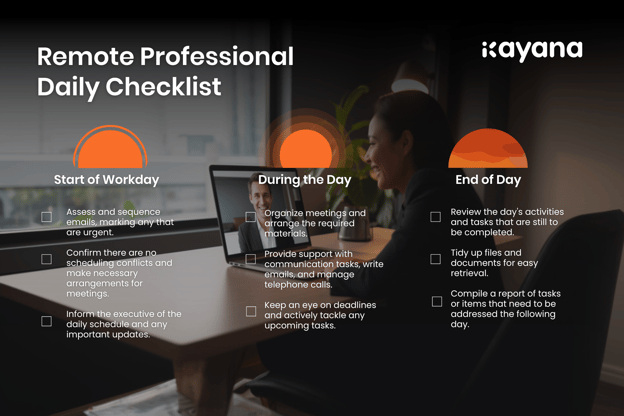
- Establish Goals and KPIs
Set clear goals and key performance indicators (KPIs) that align with the Remote Professional ’s role and the company's broader objectives. This provides a roadmap for success and helps the Remote Professional understand their priorities and their impact on the organization's mission. - Regularly Check In and Give Feedback
Schedule regular meetings to review progress, tackle challenges, and offer constructive feedback to foster ongoing development and alignment. These sessions allow the Remote Professional to share insights, request clarifications, and adjust their approach as necessary.
🌟 Wrapping Up The Executive Assistant Onboarding Process
To ensure a Smooth Transition and Long-term Success for Your Remote Professional:
Evaluate Your Remote Professional’s Performance
Thoroughly assess your Remote Professional 's performance. Review if they have achieved the goals and KPIs established, how effectively they've managed their tasks, and how well they've integrated with the team. Also, gather feedback from relevant stakeholders and team members for a comprehensive evaluation of the Remote Professional’s performance during the onboarding phase.
Foster a Growth-Oriented Mindset
Provide ongoing support and guidance throughout your Remote Professional 's career. Maintain open communication channels so the Remote Professional feels comfortable seeking help or clarification when facing challenges. Encourage them to continuously acquire new skills and professional development. Assist them in setting new goals that match their evolving role, fostering a growth-oriented mindset that benefits both the individual and the company.

Your journey with your Remote Professional starts here, and with the right onboarding, you’re setting the foundation for a smooth and productive collaboration. By following this guide, you ensure a structured, efficient, and results-driven partnership that supports your business goals.
Keep the conversation open, provide support when needed, and trust the process. Your Remote Professional is here to help you grow—so dive in, collaborate, and make the most of this new working relationship! 🚀
Need Urgent Assistance?
If you have any questions or need assistance at any point during your trial period, our support team is here to help.
Simply file a support ticket, and we’ll get back to you as soon as possible.